What does an optimized LinkedIn profile actually do?
It converts. An optimized profile is not one that ranks well or looks impressive, it is one that turns a visitor into a conversation. Everything else is secondary to that single measurement, and most profile advice ignores it entirely in favor of completeness scores and keyword density.
Your profile is doing three jobs simultaneously, and they happen in a fixed order. It has to be findable in search, then it has to be legible in about two seconds, and then it has to offer a next step. A profile that fails any one of the three fails completely, because the visitor never reaches the stage after it.
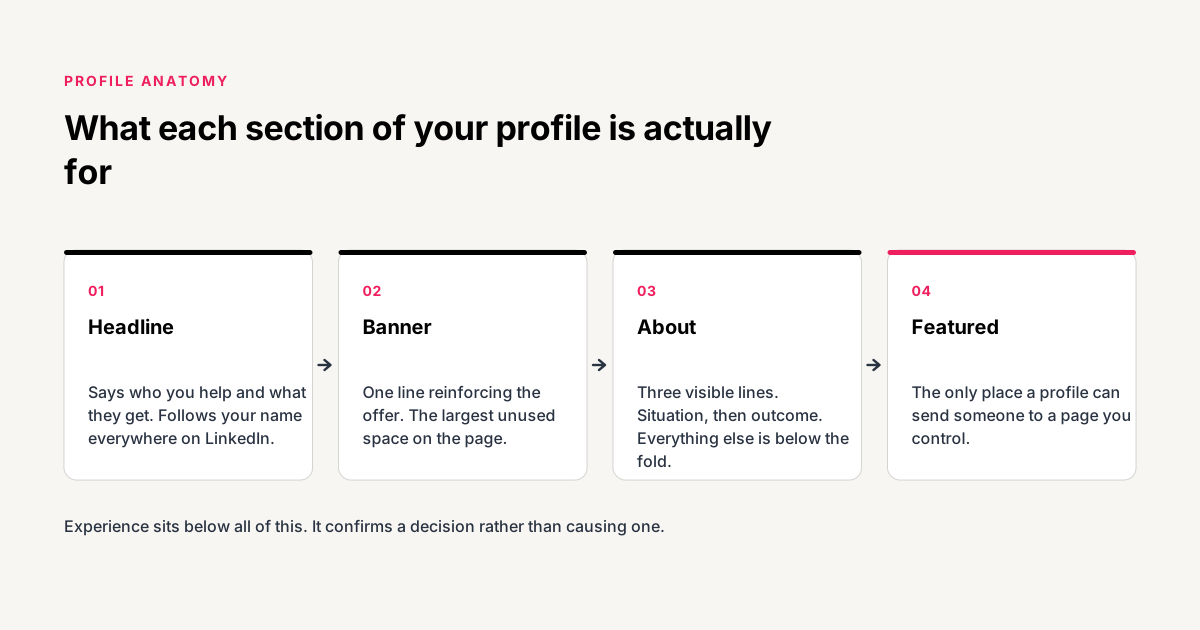
This is the disagreement worth stating early: your experience section barely matters. It is the longest part of most profiles and the part people spend the most time polishing. But a visitor reads it only after they have already decided you might be relevant, which means it confirms a decision rather than causing one. Time spent perfecting job descriptions from 2019 would be better spent on the headline, which is the thing that determines whether anyone scrolls that far.
How do you write a LinkedIn headline that gets clicks?
Name the person you help and the outcome you produce, in that order, using words your buyer would actually use. Your headline follows your name everywhere on LinkedIn: in search results, in the feed, in comment threads, in notifications. It is the single most repeated piece of copy you own and the default version wastes it on a job title.
There are 220 characters available. Most consultants use about 30 of them. The extra space is not there to be filled with adjectives, but there is room for a specific outcome and a qualifier that filters out people you cannot help.
| Default | Rewritten | What changed |
|---|---|---|
| Fractional CFO | Fractional CFO for SaaS founders. I get your books investor ready in 90 days. | Names the buyer and the outcome |
| Business Coach | I help agency owners get out of delivery and back to selling. | Describes a situation, not a role |
| Marketing Consultant | B2B demand generation for founder led teams under 20 people. | Adds a qualifier that filters |
| Founder at Acme Ltd | Helping operations directors cut manual reporting from days to hours. | Talks about them instead of you |
Include the term your buyer types into search. If people look for a "fractional CFO", the phrase "fractional CFO" needs to appear literally, because LinkedIn search matches text rather than meaning. Clever phrasing that avoids the obvious keyword makes you invisible to the exact search you wanted to win.
What should your LinkedIn about section say?
Open with the problem your reader currently has, then name the outcome, then provide proof. The default instinct is to open with your background, which asks a stranger to care about your history before you have given them a reason to. Reversing that order is the single highest impact edit available in the about section.
The structural constraint that decides everything: LinkedIn truncates the about section after roughly 265 characters on desktop and around three lines on mobile, then shows a "see more" link. Almost nobody clicks it. Whatever sits above that cut is effectively your entire about section, and everything below it is a bonus for the small number of people who were already convinced.
- Lines one and two, the situation. Describe where your buyer is right now, in their words. "You closed a funding round and inherited a finance function built for a much smaller company."
- Line three, the outcome. State plainly what changes. This is the last line most people read, so it carries the offer.
- Below the fold, the proof. Specific results, named clients where you have permission, relevant credentials. This is where your background belongs.
- The last line, the next step. Tell them exactly what to do. "The free guide below covers the first three fixes" or "book a call using the link in my featured section."
Write in first person. LinkedIn is a personal network and third person reads like a press release someone else wrote about you, which quietly reduces trust in a place where the whole point is that people are buying you.
How do you use the featured section to capture leads?
Put one clear next step there and remove everything else. The featured section sits directly beneath your about section, which makes it the first thing a visitor sees after reading your pitch. It is the only part of a LinkedIn profile that can send someone to a page you control, and it is empty on most profiles.
The mistake that undoes it is treating it as a highlights reel. Six featured items, each competing for the same click, produce fewer clicks than one. A visitor deciding between six options usually picks none, which is the same outcome as an empty section but with more work involved.
What should your LinkedIn banner image show?
One line of text that reinforces the headline, on a plain background. The banner occupies more screen area than anything else on your profile and is almost always a stock photograph of a skyline, a laptop or an abstract gradient. That space is free advertising real estate being spent on decoration.
Keep the important content in the middle. LinkedIn crops the banner differently on mobile and desktop, and your profile photo covers the lower left corner, so anything placed there disappears. A single sentence centered horizontally survives every crop.
The banner is also where a proof point works well: a named result, a recognizable client logo you have permission to show, or a number you can defend. It is seen by everyone who visits and asks nothing of them.
Does your profile photo and name field matter?
The photo matters and the name field matters more than people expect. A clear headshot where your face fills most of the frame outperforms a full body shot, because the image renders at 40 pixels wide in the feed where most people first encounter it. At that size a distant photo is an unrecognizable smudge.
The name field should contain your name and nothing else. Adding credentials, emojis or a mini pitch to the surname field is a common tactic that reads as unprofessional to buyers and violates LinkedIn's profile name policy, which risks the account. Whatever you were going to put there belongs in the headline, which has 220 characters and no such restriction.
Where should keywords go on your LinkedIn profile?
In the headline, the about section, and your job titles, phrased as complete sentences rather than lists. LinkedIn search weights these fields heavily, but a profile stuffed with terms reads badly to the humans who arrive from that search, and humans are the ones who book calls.
Pick one primary term and two or three variants. If you are a fractional CFO, the primary term is "fractional CFO" and the variants are the problems you solve: "cash flow forecasting", "investor reporting", "month end close". Use each once, naturally, in a sentence that would still make sense if you deleted the keyword.
| Field | Search weight | What to put there |
|---|---|---|
| Headline | Very high | Primary term plus the buyer and outcome |
| About section | High | Primary term once, variants naturally |
| Job titles | High | The recognizable version of your role |
| Skills | Medium | Primary term plus the top variants |
| Experience body | Low | Write for the human reading it |
What does an optimized profile change in practice?
Ruth Kiire is a work-life mastery coach for professional women. Her profile before the rebuild had a genuine problem that is easy to miss, because from the inside it looked fine. She had real experience and real certifications, and the profile listed all of them.
The full system build for Ed Perez Fitness shows the same profile work as one component of a larger acquisition system, which is the usual context for it.
What is the complete LinkedIn profile optimization checklist?
Work through these in order. The list is deliberately ordered by return rather than by where the sections appear on the page, so stopping halfway still leaves you better off than finishing the low value items first.
- Rewrite the headline. Buyer plus outcome plus the search term they actually type. Fifteen minutes, biggest single effect.
- Fill the featured section. One item, pointing at a lead magnet or a booking page. Ten minutes.
- Rewrite the first three lines of the about section. Situation, outcome, then everything else below the fold.
- Replace the banner. One sentence, centered, plain background.
- Fix the photo. Face filling the frame, plain background, recent.
- Clean the name field. Name only. Move anything else to the headline.
- Add your primary keyword to skills and job titles. Once each, naturally phrased.
- Set your custom button. Change the default Connect button to Visit my website and point it at your capture page.
The first two items take under half an hour together and account for most of the difference. If you do nothing else this week, do those. If you would rather have the whole thing rebuilt and then operated, that is what our LinkedIn presence and content service covers, and the full client acquisition system covers what happens after the profile once the leads start arriving.
How often should you update your LinkedIn profile?
Review the headline and featured section quarterly, and leave the rest alone unless something material changes. Profiles do not decay, and constant tinkering usually reflects uncertainty about positioning rather than a genuine need to update.
The exception is when your offer changes. If you have narrowed your market, raised your prices, or started selling something different, the profile needs to change on the same day. A profile that describes the work you used to do attracts the clients you used to want, and it does that quietly for months before anyone notices.
What to review each quarter
Check three things. First, whether the headline still describes the work you want more of, because most consultants drift toward a narrower or more profitable segment without updating anything. Second, whether the featured item still points somewhere that works, since landing pages get moved and links quietly break. Third, whether the proof in your banner and about section is still your best proof, because a result from two years ago is usually beaten by something more recent.
One warning about frequent editing. LinkedIn notifies your network when you change your job title or add a position, but not when you edit your headline or about section. That means positioning changes are effectively silent, so there is no reason to batch them or wait for a good moment. Fix the copy the day you notice it is wrong.
A profile is one component of a larger path, and optimizing it in isolation has a ceiling. Once visitors are converting into contacts, the constraint moves to what happens next, which is covered in our guide to building a client acquisition strategy.
Frequently asked questions
How long should a LinkedIn about section be?
The visible portion is roughly three lines, and that is what has to carry the argument. Below the fold, 200 to 400 words is plenty. Length below the cut has almost no effect either way, because the readers who expand it have already decided you are worth reading.
Should you turn on LinkedIn Creator Mode?
Only if you publish regularly. Creator Mode moves your featured section further down the page and promotes your activity feed instead, which helps if you post several times a week and hurts if you do not. For a profile whose main job is converting visitors, the default layout usually works better.
Does the LinkedIn profile strength meter matter?
Not for getting clients. The All-Star rating measures completeness, not persuasiveness, and a fully completed profile that talks only about you will convert worse than an incomplete one that speaks directly to a buyer's situation. Treat it as a rough hygiene check rather than a target.
Can you change your LinkedIn URL?
Yes, and you should. The default URL includes a string of random characters. A custom URL using your name looks better anywhere you paste it, and it is a two minute change under the Edit public profile and URL option on the right of your profile page.
Should you list every job you have ever had?
No. Include the roles that support the claim you are making now, and summarize or drop the rest. A twenty year chronology asks the reader to work out what is relevant, and most will not bother. Relevance beats completeness on a profile whose job is conversion.
How long before an optimized profile produces leads?
Immediately for the traffic you already have, since existing visitors now find a next step where previously they found none. New traffic from search takes longer, usually a few weeks, because LinkedIn needs to re-index the profile and your updated terms need to start matching queries.
Published . Last updated . 2,655 words.